


Circle K
4.58.60K Reviews
App Specs
- Version
- 4.11.2
- Updated On
- License
- Free
- Downloads
- 5,000,000+
- Developer
- Circle K North America
- Categories
- Shopping
- Platform
- Android, iOS
Screenshots
 Analysis by AppCompare
When I’m planning a quick stop, I want to know whether a nearby Circle K is convenient for the errand I actually have: fuel, a drink, or something to eat. The app brings those Circle K visits into one place on my phone. It is a free shopping app from Circle K North America, and I see its strongest use as a companion for people who already stop at the chain rather than as a replacement for every map, payment, or shopping app they use.
Making a Circle K stop easier to plan
Have you ever found yourself wandering around the city, craving a quick snack or needing to fill up your tank, and just wished you could find everything you need in one place? That's where Circle K comes in. Let me tell you, this app is like your personal convenience store right in your pocket.
That pocket-sized convenience depends on a practical detail: the phone needs a working connection when you’re looking up current information or trying to use app-based services. I wouldn’t plan a stop around an assumption that every screen or transaction will work without a network. If I’m about to leave a strong signal area, I check the details I need before setting off rather than waiting until I’m already at the pump or in a hurry.
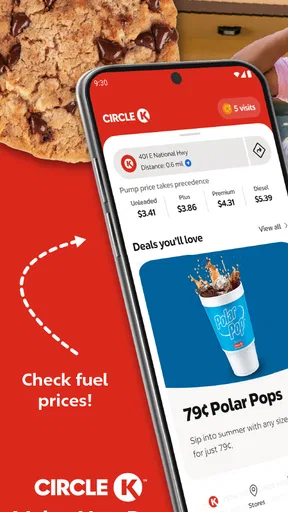
Let's dive into what makes the Circle K app a must-have for anyone on the go. First off, it's not just about finding the nearest store—though it does that beautifully with its location-based services. The app is all about making sure your trip to Circle K is as smooth and rewarding as possible.
Finding the right stop while you’re moving
Once you open the app, you'll notice it's super user-friendly. No one wants to fumble around with a complicated interface when all they need is a quick pit stop. The developers clearly had that in mind, making navigation a breeze with a clean and straightforward layout.
For a driver, “nearest” is only a starting point. The useful choice is the stop that fits the route, timing, and reason for pulling over. I’d use the locator before I get on the road, compare the Circle K options it shows, and decide where to stop while parked. That small bit of planning is more helpful than trying to browse a phone while driving, and it leaves less to sort out when traffic, a passenger, or a low fuel gauge already has my attention.
A realistic use is a late-afternoon drive when I need fuel and want to grab a drink without making two separate stops. I can check Circle K locations before turning off my route, then use the app’s relevant information to decide whether a particular stop makes sense. It won’t make every location equally useful: if the trip calls for a particular grocery item or a destination outside the chain, a general map or another retailer’s app may be the better first choice.
Worth Reading Before You Choose

EA SPORTS FC Mobile 26 Is a Bigger Football Game, but It Takes Time

Flipboard Shows What News Apps Must Do Beyond the Feed

Switching to Android Auto Means Rethinking Your Driving Routine

Google Calendar Makes a Crowded Week Easier to Manage

Ludo King Makes the Most of the Minutes Between Plans

Baby Panda World Brings Quick Play to Modern Phones, but Its Game Library Feels Busy
Rewards and Savings
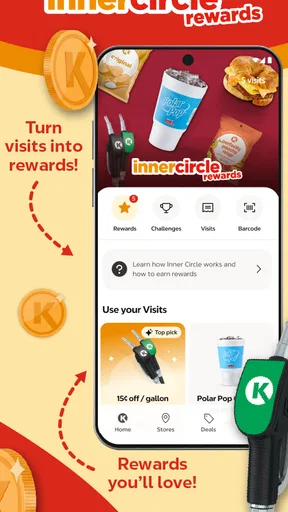
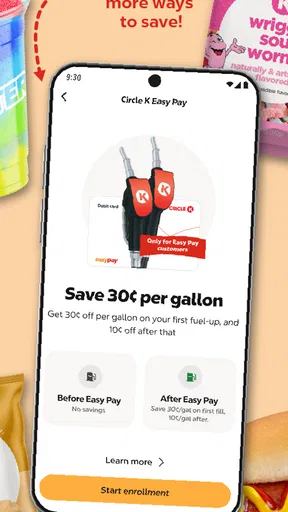
One of the standout features for me has to be the rewards system. I mean, who doesn't love saving a few bucks here and there? With the app, every purchase you make brings you closer to earning rewards. Whether it's a free coffee or discounts on fuel, there's always something up for grabs.
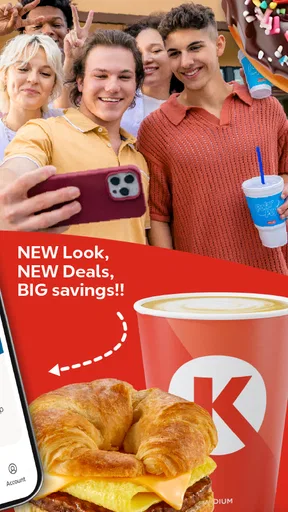
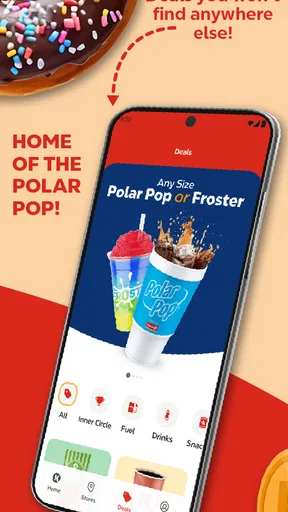
And it's not just about saving money. The app offers exclusive deals that you won't find anywhere else. So, if you're a regular at Circle K, this feature alone is worth the download.
My practical advice is to look at offers before I reach the checkout, not after I’ve paid. That gives me time to see whether a deal fits what I was already going to buy, rather than letting a promotion create an unnecessary purchase. Rewards are most compelling for people whose routines already include Circle K; if I visit only occasionally, I’d treat them as a pleasant extra instead of a reason to change my route or shopping habits.
The app’s 4.6 average rating, based on around 32,000 ratings, suggests that many users find it useful, but a rating can’t tell me whether the local stores I use have the products or offers I want. I would judge its value by my own routine: if I regularly buy coffee or fuel there, checking for relevant savings can be worthwhile; if I rarely visit, the benefits may not justify another app on my phone.
Fuel Your Journey
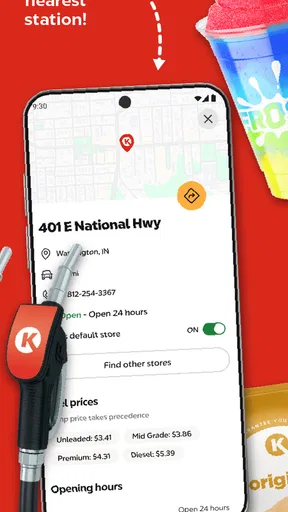
Let's talk fuel. If you're someone who's constantly on the road, the app's fuel finder feature is a godsend. It shows you the nearest Circle K locations with fuel prices updated in real-time. No more driving around aimlessly, hoping to find the best price. Plus, you can pay for your fuel right from the app, making the whole process even more seamless.
There is a connectivity trade-off here: information described as real-time is most useful when the phone can reach the service, and I would still treat displayed prices as a prompt to compare rather than a guarantee that a stop is the cheapest choice for the whole journey. A small difference in price may not be worth a detour, especially when time, traffic, or distance matters more. I’d check prices while parked, compare stops along the route, and avoid trying to make that decision while driving.
App-based fuel payment can reduce steps at a stop when it works smoothly, but it also makes the phone and connection part of the transaction. Before relying on that option, I’d make sure I can access the app and have a regular payment alternative available. That’s not a criticism unique to Circle K; it’s a sensible backup for any phone-based payment, particularly on a road trip or in a place where reception may be unreliable.
More Than Just a Store
Circle K has always been known for its wide range of products, and the app brings that to life with its store locator and product availability features. Whether you're looking for a quick snack, a cold drink, or even some emergency groceries, the app lets you check what's in stock at your nearest store.
For an unplanned errand, I’d use availability as a way to narrow down where to go, not as a reason to assume every item will be waiting exactly as expected. If I need one specific product urgently, checking before I leave is more useful than making a speculative trip. If the item is essential or I need a full grocery selection, a dedicated grocery retailer is a safer alternative; Circle K is better suited to a quick, limited stop.
And if coffee is your thing, you'll be happy to know that the app keeps you updated on their latest brews and special offers. It's like having a mini barista in your pocket.
This is also where the app makes most sense as a repeat-use tool. Someone who already knows which Circle K they visit can use it to check what is relevant before stopping, while a first-time visitor may need to compare the location with other nearby options. I would avoid treating a convenience-store app as a complete directory of everything a town offers: its value is tied to Circle K locations and the kinds of quick purchases those stores serve.
Easy Peasy Payments
In this digital age, who wants to mess around with cash? The Circle K app supports various payment methods, making transactions quick and painless. You can link your card or use mobile payment options. It's all about convenience, and this app nails it.
For a smoother visit, I’d set up any payment choice before I’m in a queue, when I have time to read the prompts and correct a mistake. I’d also keep a physical card or another familiar payment method available rather than assuming a phone will always be ready. A low battery, a sign-in interruption, or a weak connection can turn a quick checkout into a delay, so app payment is best treated as an option—not the only plan.
That distinction helps answer a common practical question: should I download the app just to pay? I would do that only if I expect to use Circle K often enough for the added convenience to matter. If I’m making a one-off stop, paying in the usual way is likely simpler; if I’m a regular, having payment and other Circle K tasks together may make repeat visits easier.
When the connection is unreliable
Network interruptions matter most at the moments when I’m trying to act quickly: checking a location, looking at current fuel information, or using an app-based payment. If a screen takes longer than expected, I’d stop and retry when safely parked rather than repeatedly tapping through while distracted. If the task still doesn’t work, I’d switch to a conventional map, ask at the store, or use another payment method. Having a fallback is more useful than assuming the app will solve every last-minute problem.
I’d also be selective about when I open it. Before a journey, I can review the information I need while connected and make a simple plan; during the drive, I can leave the phone alone and let a passenger handle any checks if necessary. This is a small workflow change, but it reduces the chance that a connectivity hiccup turns a convenience tool into a distraction.
Feedback and Support
One thing I particularly appreciate is how the app encourages feedback. If you ever have an issue or just want to share your thoughts, there's a section for that. The support team is responsive, which is always a plus in my book.
Plus, the app is regularly updated, ensuring that any bugs are squashed quickly and new features are added to enhance user experience.
Circle K has been available since July 24, 2022, and its current version is 3.57.5. The app is rated for Everyone and requires Android 10 or later, which is useful to know before installing it on an older device. It has passed five million installs, and its 8,200 reviews offer another sign that it is an established option, though individual experiences will still depend on how well its services fit a person’s local routine.
Who gets the most from it?
I’d recommend the app most readily to people who already stop at Circle K for fuel, coffee, snacks, or other quick purchases. For them, the locator, offers, rewards, and payment options can support familiar errands instead of requiring a new habit. It also makes sense for frequent drivers who prefer to check a route-side fuel stop in advance rather than decide at the last minute.
I’d be less enthusiastic about it for someone who rarely visits Circle K, wants one app to compare every fuel brand, or needs a full-service grocery tool. A general maps app is usually more useful for comparing destinations across many businesses, while a dedicated payment app may suit someone who wants to manage purchases across several retailers. Circle K’s advantage is its focus on its own locations and services; that focus is also its limit.
On data-conscious use, my approach would be straightforward: use the connection when I need to search or refresh current details, and avoid leaving the app open just because I’m travelling. I wouldn’t assume that live information stays current if the network drops. Checking only when there’s a decision to make keeps the experience focused and avoids relying on an old screen as though it were a fresh result.
In a nutshell, the Circle K app is a game-changer for anyone who frequents their stores. It's an all-in-one tool that not only saves you time and money but also makes your shopping experience more enjoyable. Whether you're a road warrior or just someone who loves a good deal, this app has something for you. So, why not give it a try and see how it fits into your daily routine?
My connectivity verdict
For me, this is a useful companion when I’m already choosing Circle K, not a must-have for every shopper or driver. Its best moments are practical ones: checking a nearby stop before setting off, looking at offers before buying, and using a convenient payment option when the phone and network cooperate. Its weak point is the same dependency that comes with many connected services: a rushed task can become awkward if the signal or app access fails.
The app is free, so a regular Circle K customer can try it without paying to install it and decide whether the everyday convenience earns a place on their home screen. I’d keep a regular map and a backup way to pay, use the Circle K tools when they genuinely save a step, and skip the app if I seldom shop there. That’s the balance that makes it worthwhile for me: helpful for planned, familiar stops, but not something I’d rely on as my only travel or shopping tool.
Pros
- User-friendly interface for easy navigation.
- Quick access to promotions and discounts.
- Convenient store locator feature.
- Secure payment options available.
- Fast and responsive customer service.
Cons
- Limited availability in certain regions.
- Occasional app glitches reported.
- In-app ads can be intrusive.
- Requires frequent updates.
- Some features need internet connection.
FAQs for Circle K
What features does the Circle K app offer?
The Circle K app provides a range of convenient features including a store locator, digital payment options, and access to exclusive deals and discounts. Users can also earn rewards through the app's loyalty program and receive real-time notifications about promotions. It's designed to enhance the shopping experience at Circle K locations.
How can I earn and redeem rewards through the Circle K app?
Earning rewards with the Circle K app is simple. Every purchase made through the app or by scanning your loyalty barcode at checkout contributes to your rewards points. Once you've accumulated enough points, you can redeem them for discounts on fuel or in-store products, making it an easy way to save money.
Is the Circle K app secure for digital payments?
Yes, the Circle K app uses advanced security measures to protect your financial information during digital transactions. It employs encryption and secure servers to ensure that your data is safe. Regular updates also help maintain the app’s security, making it a reliable option for digital payments.
Can I find Circle K locations using the app?
Absolutely, the Circle K app includes a handy store locator feature. It uses your current location to find the nearest Circle K stores and provides directions, store hours, and available services. This feature is particularly useful for travelers or when you're in an unfamiliar area.
What devices are compatible with the Circle K app?
The Circle K app is compatible with both Android and iOS devices. It requires Android 5.0 or later and iOS 11.0 or later. Ensure your device meets these requirements to enjoy all the features the app has to offer. Regular updates are also released to improve compatibility and add new features.


